
A little phone. A whole world.
Creating new
memories
together.
Meet new friends. Share your adventures.
Play games together.
AetherOS is your in-game phone for FINAL FANTASY XIV. Chat, play games, watch videos with friends and look after your companion, Lumi.
 AetherLoveA little spark starts here.
 YapperYour world, in the feed.
 oh, hi. I’m Lumi ♡
 EchoWatch videos together.
Good company, one tap away
Less tabbing out.
More being together.
Meet other players, share screenshots, watch videos and play games together. Open it all from your in-game phone.
a little chemistry ♡
AetherLove♡
Browse player profiles, find people with shared interests and chat when you match. Make new friends or find a date.
Meet AetherLoveFor the plot.And the screenshots.✳︎Yapper↗
Post updates and screenshots, follow other players and reply to their posts. Keep up with friends while you play.
Get to know YapperWatch videos together

Echo▷
Watch YouTube videos and live streams with friends. Start a room, share the code and chat while everyone watches in sync.
Explore Echo Wait. I know this place.
Wayfinder⌖
Guess an in-game location from a screenshot. Travel there and take a selfie to check your answer. Play solo or with friends.
Explore Wayfinder

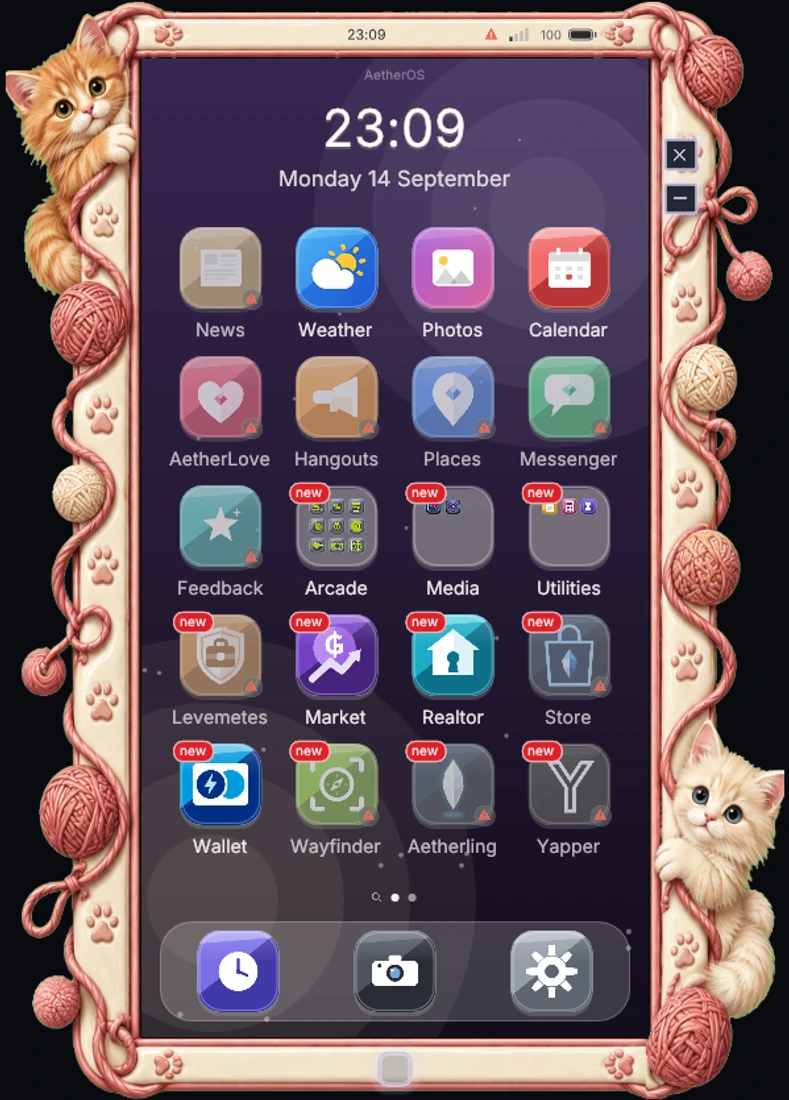
Choose your phone bezel
Same phone.
Entirely your style.
Stained glass and starlight. A neon skyline. A frame tangled up in yarn. Find a little piece of your personality in the new bezel collection.
Additional skins are separate from the built-in themes. Browse the designs here and check the in-game Store for availability.
SMALL COMPANION. BIG PERSONALITY.
Meet your new
little favourite.
This is Lumi.
Your adventures just got a little cuter.
A companion with a home inside your phone and a place beside you in the game world. Pick a look, try a new outfit, play a little, and make this little creature yours.
Say hello to LumiLumi begins with an Aethercore purchase. Forms and cosmetics have their own availability.

Dawn · Lumi preview
And there’s a whole phone more
A world in
your pocket.






Made for players. Supported by you.
Thanks for playing with us.
- Downloads since launch
- 143,564
- Last updated
From our plugin repository · Checked 24 October 2026. Downloads include updates.
Installation
Get AetherOS today!
AetherOS ships as a Dalamud plugin via our own repository. You need the game running through XIVLauncher with Dalamud enabled.

- 01
Open Dalamud settings
In game, type /xlsettings and switch to the Experimental tab.
- 02
Add our repository
Paste the repository URL below into Custom Plugin Repositories and press the + button, then save.
- 03
Install AetherOS
Open /xlplugins, search for AetherOS and press install. The phone icon appears immediately.
- 04
Unlock and enjoy
Open the phone, follow the short onboarding, and the home screen is yours.
https://puni.sh/api/repository/aetherlovePaste this URL into Dalamud's custom plugin repositories.

A familiar face. A bigger world.
Here from AetherLove?
You’re in the right place. Read how AetherLove became part of AetherOS.
Community
Built with our community
AetherOS is shaped by the people who use it. Join the Discord to suggest features, report bugs, meet the team and get help, or browse the source on GitHub.
Join the Discord Find us on XIV Mod Archive